UI Packs
Sandbox Menu Icons — 16px two-tone set
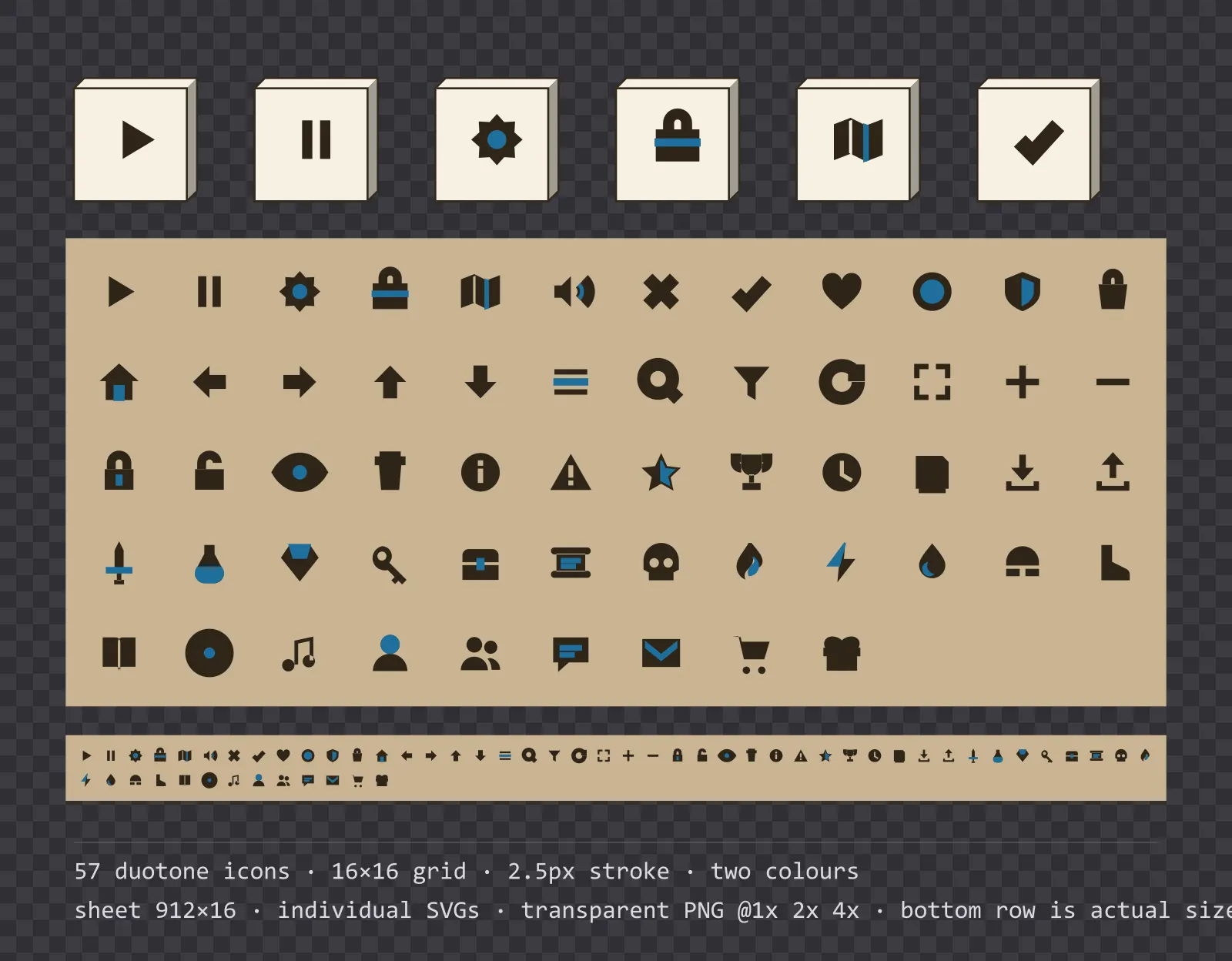
57 two-tone warm sand menu icons on a 16×16 grid, including play, pause, settings and 54 more. Sheet plus individual files.
About this pack
Two-tone icons on a 16px grid — the smallest here, because a sandbox toolbar holds twenty of them at once. The second tone does the work an outline would do, and an outline at 16px on a pale ground would close up.
All 57 icons sit on a strict 16×16 grid with a uniform 2.5 px stroke weight, and they share the same optical weight, so a row of them looks like one set rather than 57 drawings that happen to be the same size. The set covers play, pause, settings, inventory, map, sound, close, confirm, health, currency, defence, loot, home, back, forward, up, down, menu, search, filter, refresh, fullscreen, add, remove, locked, unlocked, view, delete, info, warning, star, trophy, time, save, download, upload, weapon, potion, gem, key, chest, quest, danger, fire, energy, mana, armour, speed, skills, target, music, profile, party, chat, mail, shop and reward.
Each icon carries exactly two values: a body colour and one accent detail picked out inside it. That is the whole palette — no shadows, no gradients, no bevels — so recolouring the set is two find-and-replaces, and the accent stays available for whatever your interface uses it for elsewhere.
The set ships three ways. Individual SVGs are the ones to use if your engine rasterises vectors or you plan to edit them. The 912×16 sheet lays all 57 out on the same grid for engines that prefer one texture and a rectangle offset — cell N starts at x = N × 16. The PNG exports cover 1x, 2x and 4x with clean transparent edges.
Download
Direct link · no sign-up · no wait pageComplete set — individual SVGs, sheet, PNG exports at 1x/2x/4x

How to use it
- From the sheet, icon N occupies the rectangle x = N × 16, y = 0, width 16, height 16 — in that order: play, pause, settings, inventory, map, sound, close, confirm, health, currency, defence, loot, home, back, forward, up, down, menu, search, filter, refresh, fullscreen, add, remove, locked, unlocked, view, delete, info, warning, star, trophy, time, save, download, upload, weapon, potion, gem, key, chest, quest, danger, fire, energy, mana, armour, speed, skills, target, music, profile, party, chat, mail, shop, reward.
- Keep the icons on whole pixels at 1x, 2x or 4x; rendering a 2.5 px stroke at a fractional scale is what turns a crisp icon into a grey smudge.
- To recolour, change the two values in the SVG: the body colour and the accent detail. A flat tint on the PNG will collapse both into one colour, so recolour at the SVG level if you need to keep the two-tone reading.
- For touch targets, keep the 16 px icon and grow the button behind it rather than scaling the icon; the stroke weight is tuned to this size.
License
Creative Commons Zero 1.0 — Public domain. No credit required. Full terms · What this means in practice
Also browse
More UI Packs
See all →
Aetherlab Backdrops
13 magitech background and overlay pieces for dark interfaces — lab navy with aether cyan accents. SVG plus transparent PNG at 1x, 2x and 4x.

Aetherlab Card Frames
18 magitech card, currency and notification components for dark interfaces — lab navy with aether cyan accents. SVG plus transparent PNG at 1x, 2x and 4x.

Aetherlab Character Sheet
12 magitech character sheet and stat widgets for dark interfaces — lab navy with aether cyan accents. SVG plus transparent PNG at 1x, 2x and 4x.

Aetherlab Crafting UI
13 magitech crafting and recipe widgets for dark interfaces — lab navy with aether cyan accents. SVG plus transparent PNG at 1x, 2x and 4x.